
Webhook for Messages & Status Changes in ChatSyncs
The four independent webhook triggers on a bot's Webhook tab — Incoming/Outgoing Message, Message Status, and Conversation Status Change — and how to use each.
Send every message a bot receives (and every reply it sends) to your own server, in real time — plus two more triggers for status changes, all on the same Webhook tab in Bot Settings.

Four independent triggers#

| Trigger | Fires when | Typical use |
|---|---|---|
| Incoming Message | A customer sends the bot a message. | CRM logging, support tickets, ERP integration. |
| Outgoing Message | The bot sends a reply. | Store conversation history, reporting, performance tracking. |
| Message Status Change | A sent message's delivery status changes (sent, delivered, read, failed). | Track delivery failures, confirm read receipts. |
| Conversation Status Change | The conversation's status changes (resolved, archived, blocked, etc.). | Sync conversation state into an external helpdesk or CRM. |
Each trigger is independent — enable any combination, and each has its own Webhook URL field so they can point at the same endpoint or four different ones.
Open Webhook
Go to Chatbot Manager, select your bot, click Bot Settings, then the Webhook tab.
Enable the trigger(s) you need
Turn on any of the four toggles.
Enter each Webhook URL
Fill in the URL field that appears under each enabled toggle.
Publish Changes
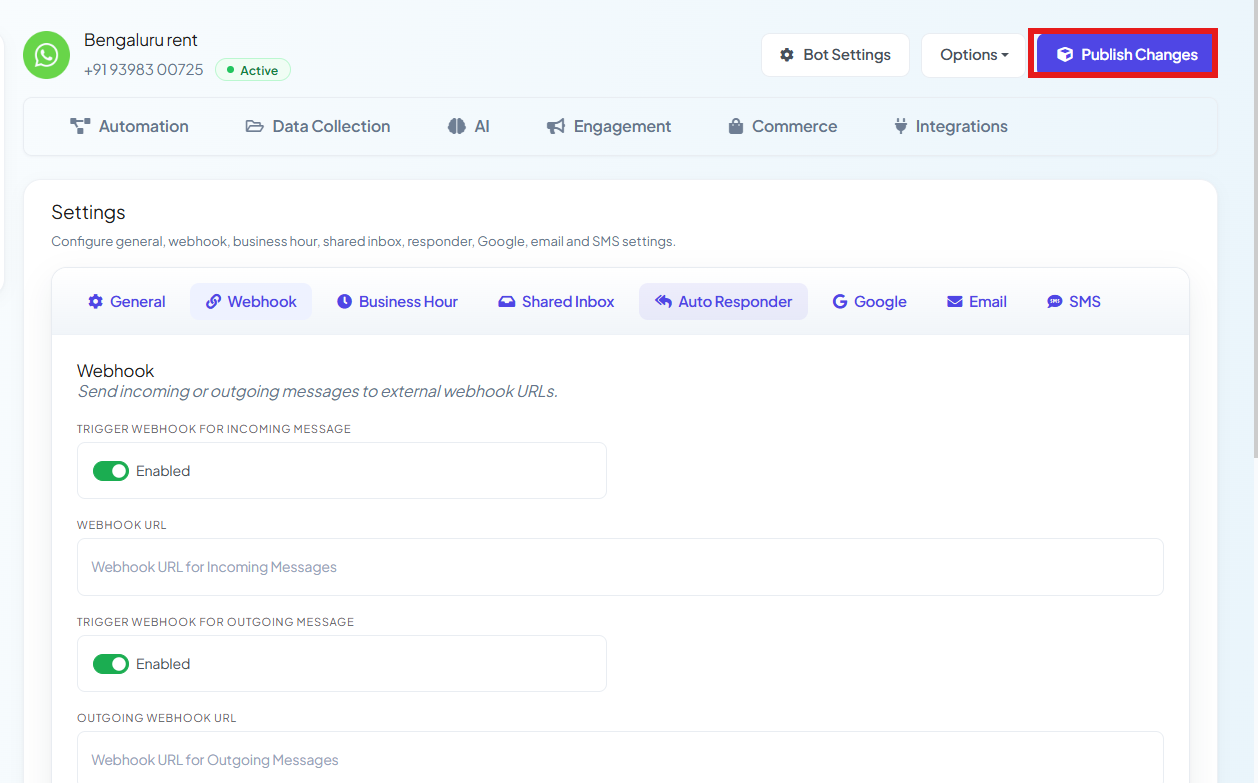
After pasting in your webhook URL(s), click Publish Changes — nothing goes live until you do.

Examples#
Every trigger POSTs a JSON body. These are real captured payloads (subscriber phone number, name, and endpoint replaced with placeholders) — every receiving tool (n8n, Make, your own server) wraps the single event in a one-item array like this.

Incoming Message — a customer sends "Hi".

Your server receives:
{
  "whatsapp_bot_name": "Bengaluru rent",
  "whatsapp_bot_id": 419957,
  "subscriber_id": "919876543210-419957",
  "wa_message_id": "wamid.HBgMOTE5ODc2NTQzMjEw...",
  "label_names": "batch2",
  "custom_fields": {
    "Phone_Number": "919876543210",
    "custom_fields": {
      "city": "Hyderabad",
      "product": "Laptop"
    }
  },
  "first_name": "Rahul",
  "chat_id": "919876543210",
  "user_message": "Hi",
  "whatsapp_bot_username": "+91 98765 43210"
}
custom_fields carries every Custom Field currently saved on that subscriber — here city and
product — alongside the message itself in user_message.
Outgoing Message — the bot sends a reply.

Your server receives:
{
  "whatsapp_bot_name": "Bengaluru rent",
  "whatsapp_bot_id": 419957,
  "subscriber_id": "919876543210-419957",
  "wa_message_id": "wamid.HBgTSU4uMTUyNjg5MzA1NTQ3NDg3OA...",
  "label_names": "batch2",
  "first_name": "Rahul",
  "chat_id": "919876543210",
  "whatsapp_bot_username": "+91 98765 43210"
}Message Status Change — a sent message moves from sent → delivered → read, or fails.

Your server receives, on each transition:
{
  "whatsapp_bot_name": "Bengaluru rent",
  "whatsapp_bot_id": 419957,
  "subscriber_id": "919876543210-419957",
  "wa_message_id": "wamid.HBgTSU4uMTUyNjg5MzA1NTQ3NDg3OA...",
  "label_names": "batch2",
  "webhook_type": "message_status_change",
  "message_status": "delivered",
  "status_time": "2026-08-20 02:15:05",
  "failed_reason": null,
  "first_name": "Rahul",
  "chat_id": "919876543210",
  "whatsapp_bot_username": "+91 98765 43210"
}
message_status is one of sent, delivered, read, or failed — when it's failed,
failed_reason carries the reason instead of null.
Conversation Status Change — an agent marks a conversation Resolved in the Shared Inbox (or via the Mark Conversation Status API).

Your server receives:
{
  "whatsapp_bot_name": "Bengaluru rent",
  "whatsapp_bot_id": 419957,
  "subscriber_id": "919876543210-419957",
  "wa_message_id": "",
  "label_names": "",
  "event": "conversation.resolved",
  "action": "resolved",
  "action_status": "1",
  "agent_name": "Priya",
  "changed_at": "2026-08-29 02:38:21",
  "first_name": "Rahul",
  "chat_id": "919876543210",
  "whatsapp_bot_username": "+91 98765 43210"
}event— a namespaced identifier for what happened, e.g.conversation.resolved.action— the plain status name: one ofresolved,reopen,archived,unarchived,blocked, orunblocked— the same states as the Mark Conversation Status API.action_status—"1"confirms the change actually succeeded.agent_name— which team member (or system) made the change.changed_at— when it happened, in your account's local time.wa_message_idandlabel_namesarrive empty here — a conversation status change isn't tied to one specific message or label, unlike the other three triggers.
Frequently asked#
Do I have to enable all four triggers together?
No — each toggle and its URL field is independent. Enable only the ones you actually need.
Can each trigger send to a different URL?
Yes — every trigger has its own Webhook URL field, so you can route incoming messages to one system and status changes to another.
What's the difference between Message Status Change and Conversation Status Change?
Message Status Change tracks one message's delivery lifecycle (sent/delivered/read/failed). Conversation Status Change tracks the whole conversation's state (resolved, archived, blocked, etc.) — see Mark Conversation Status for the same states via the API.
Where do I enable these?
Chatbot Manager → [your bot] → Bot Settings → Webhook tab — see How Do I Turn On Webhook Triggers for My Bot? for the full Bot Settings reference.
Was this page helpful?
Still stuck? Open a support ticket and our team will help.