
How to Make a Chatbot Reply to Any Keyword in ChatSyncs
How to give your bot a catch-all reply for messages that don't match any keyword you've set up.
A Keyword Replies flow only replies to the exact words you've set up as Trigger Keywords. If a customer types anything else, the bot stays silent by default.
Example: Say your bot only has a flow set up for the word menu. If a customer types
menu, the bot replies. But if that same customer types hi, pricing, or help, the bot
does nothing — because none of those words were set up as a Trigger Keyword.
To fix this, set up a catch-all reply that fires for anything that doesn't match a Trigger Keyword.
That catch-all is the No Match action, not a special keyword you type in. It has two halves, set up in two different places:
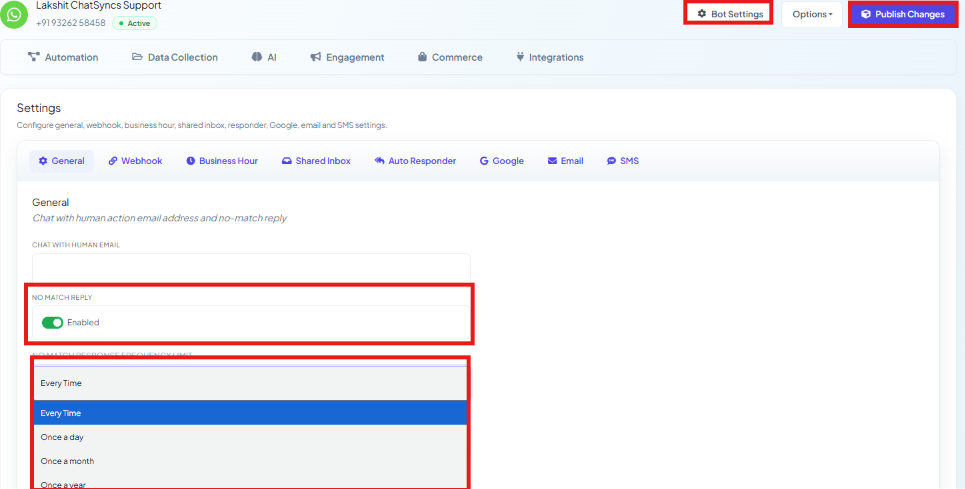
Turn it on in Bot Settings → General
Enable No Match Reply, and set No Match Response Frequency Limit — Every Time, Once a Day, Once a Month, or Once a Year — so the same customer doesn't get the fallback reply on every single unmatched message. Click Publish Changes to save.
Build the reply in Automation → Quick Actions
Open Automation → Quick Actions, then click the No Match tile in the Action Buttons grid to build the actual flow that runs.
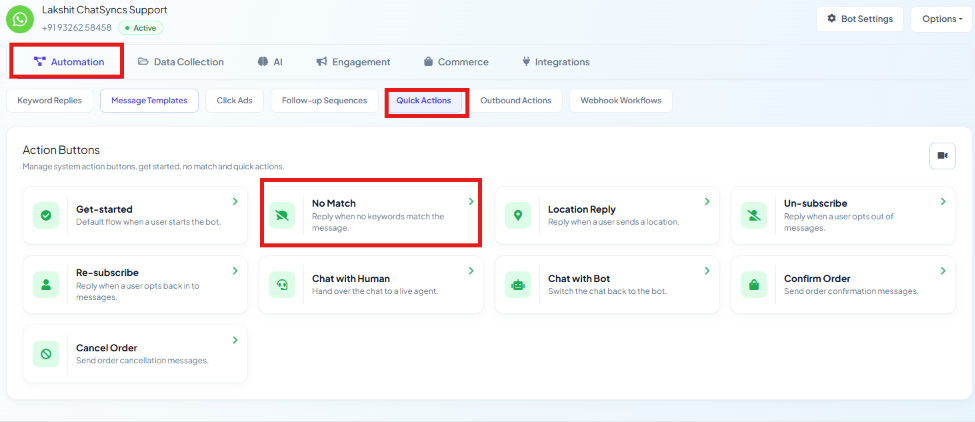


See How to Set Up Quick Actions (No Match, Get Started, and More) for the full No Match flow-building walkthrough.
Example: A customer types pizza, help me, or anything else with no matching flow.
Instead of getting ignored, No Match catches it and replies with something like "I'm not
sure I understood — type 'menu' to see what I can help with."

Frequently asked#
Can I make one flow trigger on literally any message?
Not as a keyword you type — instead, enable No Match Reply in Bot Settings → General, then build its flow under Automation → Quick Actions → No Match. Together they catch every message that didn't match a set trigger keyword.
Why isn't my No Match reply firing for a customer who already got it once today?
Check No Match Response Frequency Limit in Bot Settings → General — if it's set to Once a Day (or longer), the same customer only gets the fallback reply once per that period, even if they send several more unmatched messages.
Is there a way to match 'contains' instead of an exact keyword?
Yes — the keyword matching type on a flow's trigger can be set to match partially, not just an exact word. See How to Create a Keyword-Based WhatsApp Chatbot for the trigger setup.
Was this page helpful?
Still stuck? Open a support ticket and our team will help.