ChatSyncs Help Center
DocumentationVideo TutorialsSupport Ticket
Developer APIREST endpoints for messages, contacts and templates.MCP serverConnect Claude, ChatGPT or Cursor to your account.
Sign inSupport sign-in
  • Docs
  • Videos
  • Tickets
  • For developers

    Developer APIREST endpoints for messages, contacts and templates.MCP serverConnect Claude, ChatGPT or Cursor to your account.
ChatSyncs Help Center

Guides, video lessons and support for ChatSyncs.

Help

  • Documentation
  • Video Tutorials
  • Search

Support

  • Get help
  • Your tickets
  • New ticket

Developers

  • MCP ↗
  • Developer API ↗

ChatSyncs

  • Open ChatSyncs ↗
  • Website ↗

© 2026 ChatSyncs

  • Overview
    • What Is Meta — and Why Do You Need a Facebook Account for WhatsApp?
    • What Is the WhatsApp Cloud API?
    • What Is a Meta Business Portfolio? (vs. Business Manager)
    • What Is a Meta Developer Account — and What Is an 'App'?
    • What Is a WABA (WhatsApp Business Account)?
    • Which WhatsApp Connection Method Is Right for You with ChatSyncs?
    • How to Connect Your WhatsApp Business App to ChatSyncs
    • What Is a BSP — and Can You Move to ChatSyncs From One?
    • Business Verification, Display Name, Green Tick — What's the Difference?
    • WhatsApp Business API Explained (And the Verification Myth)
    • Who Charges You for WhatsApp — Meta or ChatSyncs?
    • What WhatsApp API Pricing Really Means
    • WhatsApp Rules: How to Never Get Banned
  • Setup and Configuration
    • How to Connect Your Number to ChatSyncs
    • How to Connect Your WhatsApp Business App to ChatSyncs
    • How to Create a Facebook Business Manager Account for ChatSyncs
    • Set Up Your Meta Business Account for WhatsApp
    • How to Connect Your WhatsApp Account Manually (Alternative Method) in ChatSyncs
    • How to Add Payment Method for WhatsApp API Billing
    • How to Update Your WhatsApp Business Profile
    • How to Migrate from WhatsApp App to a ChatSyncs Business Account
    • How to Disconnect Another Partner From Your WhatsApp Number
    • How to Reconnect Your Disconnected ChatSyncs Account
    • How to Delete Your Phone Number on Meta
    • Transactions in ChatSyncs
  • Bot Settings
    • How Do I Configure General Bot Behavior with ChatSyncs?
    • How Do I Turn On Webhook Triggers for My Bot with ChatSyncs?
    • How Do I Set Up Business Hours for My Bot with ChatSyncs?
    • How Do I Configure Shared Inbox Settings for My Bot with ChatSyncs?
    • How Do I Automatically Add Subscribers to My Email Marketing List with ChatSyncs?
    • How Do I Save Subscriber Details to Google from My Bot with ChatSyncs?
    • How Do I Send an Automatic Email from My Bot with ChatSyncs?
    • How Do I Send an Automatic SMS from My Bot with ChatSyncs?
  • Subscriber Manager
    • What Is Subscriber Manager in ChatSyncs?
    • How Do I Manage Custom Fields, Labels, and Lists with ChatSyncs?
    • How Do I Import Subscribers Using a CSV File with ChatSyncs?
    • How Do I Add a Subscriber Manually with ChatSyncs?
    • How Do I Import Subscribers from Google Sheets with ChatSyncs?
    • How to Import Contacts from Google Contacts in ChatSyncs
  • Automation
    • How to Create a Keyword-Based WhatsApp Chatbot in ChatSyncs
    • How to Set Up Quick Actions (No Match, Get Started, and More) in ChatSyncs
    • How to Make a Chatbot Reply to Any Keyword in ChatSyncs
    • User Input Flow in ChatSyncs
    • WhatsApp Flow Forms in ChatSyncs
    • How to Connect a Bot Flow to External Systems in ChatSyncs
    • How to Build Automatic Follow-Up Chatbots on WhatsApp in ChatSyncs
    • How to Set Up Sales Sequence Chatbots in ChatSyncs
    • How to Add Clickable CTA Buttons in ChatSyncs
    • Audio Message in ChatSyncs
    • How to Add a WhatsApp Chat Widget to Your Website in ChatSyncs
    • How to Use User Input Flow in the Chat Widget in ChatSyncs
    • How to Add ChatSyncs Chat Widget to WordPress
  • Message Templates
    • Creating a WhatsApp Message Template in ChatSyncs
    • Why Templates Get Rejected and How to Fix Them in ChatSyncs
    • Character Limits for Media Message Templates in ChatSyncs
    • Guidelines for Utility and Marketing Templates in ChatSyncs
    • Understanding Conversations and Their Types in ChatSyncs
    • How to Create and Use Carousel Media Templates in ChatSyncs
    • Create Templates in WhatsApp Manager and Sync to ChatSyncs
    • Template Variables vs Custom Variables — What's the Difference with ChatSyncs?
    • Templates to Restart Conversations After Non-Working Hours in ChatSyncs
    • Understanding WhatsApp Quality Rating in ChatSyncs
  • Broadcasting
    • Send a Bulk Message to Many People
  • Shared Inbox
    • Introduction to Shared Inbox in ChatSyncs
    • Filter Conversations by Channel & Account in ChatSyncs
    • Organize Conversations with Labels, Views & Search in ChatSyncs
    • AI Translation & Message Rewrite in ChatSyncs
    • Team Collaboration & Agent Assignment in ChatSyncs
    • Messaging Tools: Canned Responses, Templates & Attachments in ChatSyncs
    • Follow-up Reminders & Message Sequences in ChatSyncs
    • Managing Customer Data with Custom Fields in ChatSyncs
    • Settings Menu: Groupchat Widget, Dark Mode, Follow-up List & More in ChatSyncs
    • Install ChatSyncs on Android
    • Install ChatSyncs on iOS
  • Webhooks
    • Webhook for Messages & Status Changes in ChatSyncs
    • Webhook on Keyword Trigger in ChatSyncs
    • Webhook on Button Click in ChatSyncs
    • Webhook for Input Flow in ChatSyncs
    • Webhook for WhatsApp Flows in ChatSyncs
  • Webhook Workflow
    • Create a Webhook Workflow in ChatSyncs
    • Webhook Automation Settings in ChatSyncs
    • Webhook Workflow Reporting in ChatSyncs
  • Integrations
    • How to Integrate Shopify for WhatsApp Automation in ChatSyncs
    • How to Connect Google to ChatSyncs
    • Google Sheet Fetch in ChatSyncs
    • How to Send Automated WhatsApp Messages on WP Form Submission in ChatSyncs
    • How to Set Up SMS Marketing in ChatSyncs
    • HTTP API Integration in ChatSyncs
    • Email Integration in ChatSyncs
    • How Do I Connect an SMTP Email Provider with ChatSyncs?
    • How Do I Connect Mailgun for Sending Email with ChatSyncs?
    • How Do I Connect Postmark for Transactional Email with ChatSyncs?
    • SMS Integration in ChatSyncs
    • How Do I Connect Twilio for SMS with ChatSyncs?
    • How Do I Connect Africa's Talking for SMS with ChatSyncs?
    • How Do I Connect a Custom SMS Gateway via HTTP GET with ChatSyncs?
    • Auto Responder Integration in ChatSyncs
    • How Do I Connect Brevo for Auto Responder with ChatSyncs?
    • How Do I Connect Mailchimp for Auto Responder with ChatSyncs?
    • How Do I Connect ActiveCampaign for Auto Responder with ChatSyncs?
    • How Do I Connect Mautic for Auto Responder with ChatSyncs?
  • AI Agents
    • How to Create Your First AI Agent in ChatSyncs
    • How to Train Your AI Chatbot in ChatSyncs
    • Agent Routing in ChatSyncs
    • AI Agent Actions in ChatSyncs
    • How Do I Restrict AI on Specific Keywords with ChatSyncs?
    • How Do I Auto-Assign Conversations to a Department with ChatSyncs?
    • How Do I Build a Multi-Agent AI Workforce with ChatSyncs?
  • Team Management
    • Introduction to Team Management in ChatSyncs
    • How to Add and Manage Team Members in ChatSyncs
    • How to Set Up User Roles and Permissions in ChatSyncs
    • Security in ChatSyncs
  • Account Safety
    • WhatsApp Account Bans: Causes and How to Stay Protected in ChatSyncs
    • How to Appeal a WhatsApp Business API Ban and Get Your Number Back in ChatSyncs
MCP ↗Developer API ↗
Browse guides
  • Overview
    • What Is Meta — and Why Do You Need a Facebook Account for WhatsApp?
    • What Is the WhatsApp Cloud API?
    • What Is a Meta Business Portfolio? (vs. Business Manager)
    • What Is a Meta Developer Account — and What Is an 'App'?
    • What Is a WABA (WhatsApp Business Account)?
    • Which WhatsApp Connection Method Is Right for You with ChatSyncs?
    • How to Connect Your WhatsApp Business App to ChatSyncs
    • What Is a BSP — and Can You Move to ChatSyncs From One?
    • Business Verification, Display Name, Green Tick — What's the Difference?
    • WhatsApp Business API Explained (And the Verification Myth)
    • Who Charges You for WhatsApp — Meta or ChatSyncs?
    • What WhatsApp API Pricing Really Means
    • WhatsApp Rules: How to Never Get Banned
  • Setup and Configuration
    • How to Connect Your Number to ChatSyncs
    • How to Connect Your WhatsApp Business App to ChatSyncs
    • How to Create a Facebook Business Manager Account for ChatSyncs
    • Set Up Your Meta Business Account for WhatsApp
    • How to Connect Your WhatsApp Account Manually (Alternative Method) in ChatSyncs
    • How to Add Payment Method for WhatsApp API Billing
    • How to Update Your WhatsApp Business Profile
    • How to Migrate from WhatsApp App to a ChatSyncs Business Account
    • How to Disconnect Another Partner From Your WhatsApp Number
    • How to Reconnect Your Disconnected ChatSyncs Account
    • How to Delete Your Phone Number on Meta
    • Transactions in ChatSyncs
  • Bot Settings
    • How Do I Configure General Bot Behavior with ChatSyncs?
    • How Do I Turn On Webhook Triggers for My Bot with ChatSyncs?
    • How Do I Set Up Business Hours for My Bot with ChatSyncs?
    • How Do I Configure Shared Inbox Settings for My Bot with ChatSyncs?
    • How Do I Automatically Add Subscribers to My Email Marketing List with ChatSyncs?
    • How Do I Save Subscriber Details to Google from My Bot with ChatSyncs?
    • How Do I Send an Automatic Email from My Bot with ChatSyncs?
    • How Do I Send an Automatic SMS from My Bot with ChatSyncs?
  • Subscriber Manager
    • What Is Subscriber Manager in ChatSyncs?
    • How Do I Manage Custom Fields, Labels, and Lists with ChatSyncs?
    • How Do I Import Subscribers Using a CSV File with ChatSyncs?
    • How Do I Add a Subscriber Manually with ChatSyncs?
    • How Do I Import Subscribers from Google Sheets with ChatSyncs?
    • How to Import Contacts from Google Contacts in ChatSyncs
  • Automation
    • How to Create a Keyword-Based WhatsApp Chatbot in ChatSyncs
    • How to Set Up Quick Actions (No Match, Get Started, and More) in ChatSyncs
    • How to Make a Chatbot Reply to Any Keyword in ChatSyncs
    • User Input Flow in ChatSyncs
    • WhatsApp Flow Forms in ChatSyncs
    • How to Connect a Bot Flow to External Systems in ChatSyncs
    • How to Build Automatic Follow-Up Chatbots on WhatsApp in ChatSyncs
    • How to Set Up Sales Sequence Chatbots in ChatSyncs
    • How to Add Clickable CTA Buttons in ChatSyncs
    • Audio Message in ChatSyncs
    • How to Add a WhatsApp Chat Widget to Your Website in ChatSyncs
    • How to Use User Input Flow in the Chat Widget in ChatSyncs
    • How to Add ChatSyncs Chat Widget to WordPress
  • Message Templates
    • Creating a WhatsApp Message Template in ChatSyncs
    • Why Templates Get Rejected and How to Fix Them in ChatSyncs
    • Character Limits for Media Message Templates in ChatSyncs
    • Guidelines for Utility and Marketing Templates in ChatSyncs
    • Understanding Conversations and Their Types in ChatSyncs
    • How to Create and Use Carousel Media Templates in ChatSyncs
    • Create Templates in WhatsApp Manager and Sync to ChatSyncs
    • Template Variables vs Custom Variables — What's the Difference with ChatSyncs?
    • Templates to Restart Conversations After Non-Working Hours in ChatSyncs
    • Understanding WhatsApp Quality Rating in ChatSyncs
  • Broadcasting
    • Send a Bulk Message to Many People
  • Shared Inbox
    • Introduction to Shared Inbox in ChatSyncs
    • Filter Conversations by Channel & Account in ChatSyncs
    • Organize Conversations with Labels, Views & Search in ChatSyncs
    • AI Translation & Message Rewrite in ChatSyncs
    • Team Collaboration & Agent Assignment in ChatSyncs
    • Messaging Tools: Canned Responses, Templates & Attachments in ChatSyncs
    • Follow-up Reminders & Message Sequences in ChatSyncs
    • Managing Customer Data with Custom Fields in ChatSyncs
    • Settings Menu: Groupchat Widget, Dark Mode, Follow-up List & More in ChatSyncs
    • Install ChatSyncs on Android
    • Install ChatSyncs on iOS
  • Webhooks
    • Webhook for Messages & Status Changes in ChatSyncs
    • Webhook on Keyword Trigger in ChatSyncs
    • Webhook on Button Click in ChatSyncs
    • Webhook for Input Flow in ChatSyncs
    • Webhook for WhatsApp Flows in ChatSyncs
  • Webhook Workflow
    • Create a Webhook Workflow in ChatSyncs
    • Webhook Automation Settings in ChatSyncs
    • Webhook Workflow Reporting in ChatSyncs
  • Integrations
    • How to Integrate Shopify for WhatsApp Automation in ChatSyncs
    • How to Connect Google to ChatSyncs
    • Google Sheet Fetch in ChatSyncs
    • How to Send Automated WhatsApp Messages on WP Form Submission in ChatSyncs
    • How to Set Up SMS Marketing in ChatSyncs
    • HTTP API Integration in ChatSyncs
    • Email Integration in ChatSyncs
    • How Do I Connect an SMTP Email Provider with ChatSyncs?
    • How Do I Connect Mailgun for Sending Email with ChatSyncs?
    • How Do I Connect Postmark for Transactional Email with ChatSyncs?
    • SMS Integration in ChatSyncs
    • How Do I Connect Twilio for SMS with ChatSyncs?
    • How Do I Connect Africa's Talking for SMS with ChatSyncs?
    • How Do I Connect a Custom SMS Gateway via HTTP GET with ChatSyncs?
    • Auto Responder Integration in ChatSyncs
    • How Do I Connect Brevo for Auto Responder with ChatSyncs?
    • How Do I Connect Mailchimp for Auto Responder with ChatSyncs?
    • How Do I Connect ActiveCampaign for Auto Responder with ChatSyncs?
    • How Do I Connect Mautic for Auto Responder with ChatSyncs?
  • AI Agents
    • How to Create Your First AI Agent in ChatSyncs
    • How to Train Your AI Chatbot in ChatSyncs
    • Agent Routing in ChatSyncs
    • AI Agent Actions in ChatSyncs
    • How Do I Restrict AI on Specific Keywords with ChatSyncs?
    • How Do I Auto-Assign Conversations to a Department with ChatSyncs?
    • How Do I Build a Multi-Agent AI Workforce with ChatSyncs?
  • Team Management
    • Introduction to Team Management in ChatSyncs
    • How to Add and Manage Team Members in ChatSyncs
    • How to Set Up User Roles and Permissions in ChatSyncs
    • Security in ChatSyncs
  • Account Safety
    • WhatsApp Account Bans: Causes and How to Stay Protected in ChatSyncs
    • How to Appeal a WhatsApp Business API Ban and Get Your Number Back in ChatSyncs
MCP ↗Developer API ↗
DocumentationIntegrations

How to Connect Google to ChatSyncs

How to connect a Google account to ChatSyncs so it can write to Google Sheets and use Google Calendar and Contacts to save subscriber and form data.

On this page
  • Connecting an account
  • Using the connected account
  • Google Sheets
  • Google Calendar
  • Use cases
  • Frequently asked
  • Learn From a Use Case
ChatSyncs Connect Account page listing available connections — WhatsApp, Google, Shopify, WooCommerce, Salla — with the Connect Google button highlighted

Connect Account → Google connects a Google account to ChatSyncs so it can:

  • Write data into Google Sheets.
  • (Once connected) also be used for Google Calendar and Google Contacts.

Click Connect Google on the Connect Account page to open the Google Integration screen:

Google Integration page showing Google Accounts, Sheets Access, Calendar Access, and Limited Access counts, with a Connect Google Account card and Sign in with Google button

Connecting an account#

  1. 1

    Sign in with Google

    Click Sign in with Google, then pick the Google account to connect from the account picker:
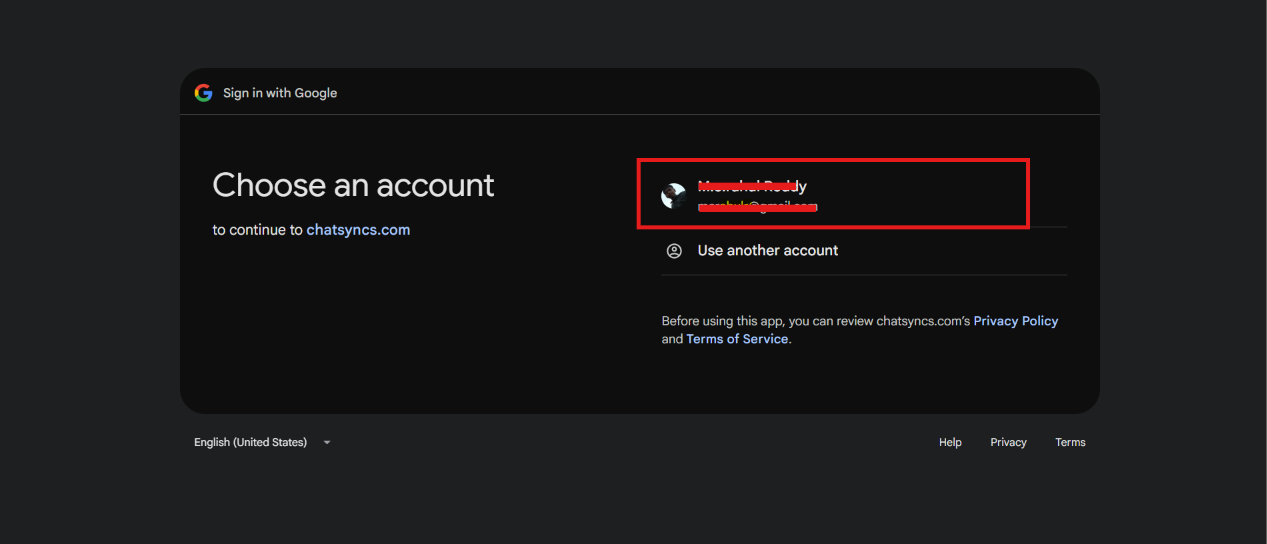
    Google account picker shown after clicking Sign in with Google
  2. 2

    Grant the requested permissions

    Review and check what ChatSyncs can access, then click Continue. ChatSyncs requests:

    • Contacts — see, edit, download, and permanently delete your Google contacts
    • Google Drive — see, edit, create, and delete only the specific files ChatSyncs creates
    • Google Sheets — see, edit, create, and delete your Google Sheets spreadsheets
    • Google Calendar — see, edit, share, and permanently delete calendars you can access
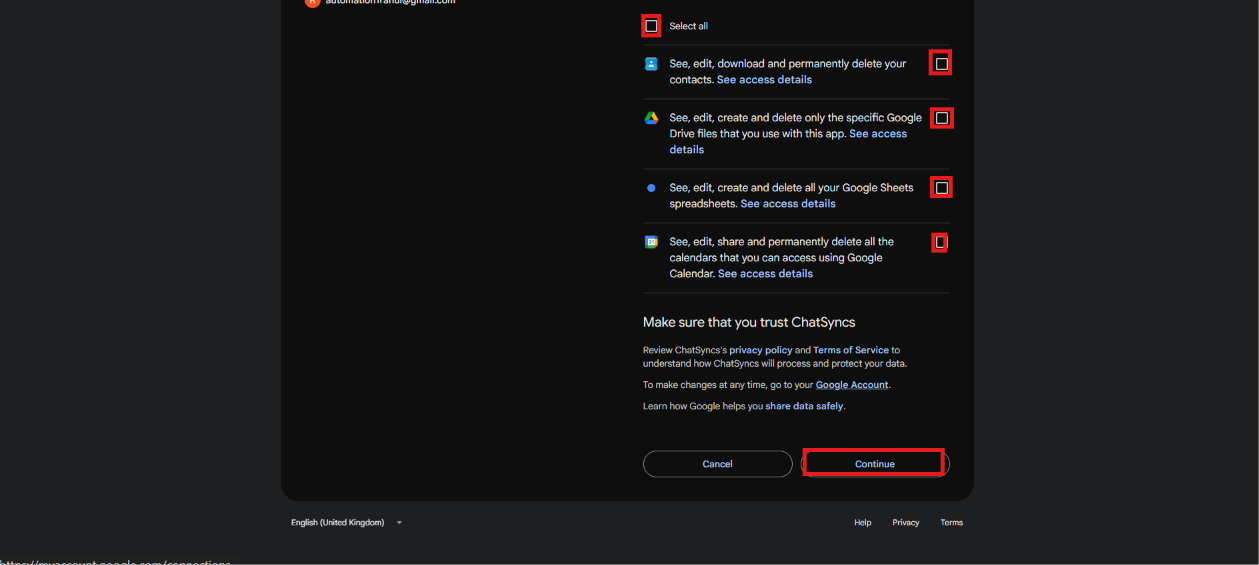
    Google consent screen listing Contacts, Drive, Sheets, and Calendar permissions with checkboxes and a Continue button
  3. 3

    Confirm on reconnect

    If the account was connected before and you're reconnecting (e.g. after re-authorizing), Google shows a shorter "You're signing back in to ChatSyncs" screen — click Continue.
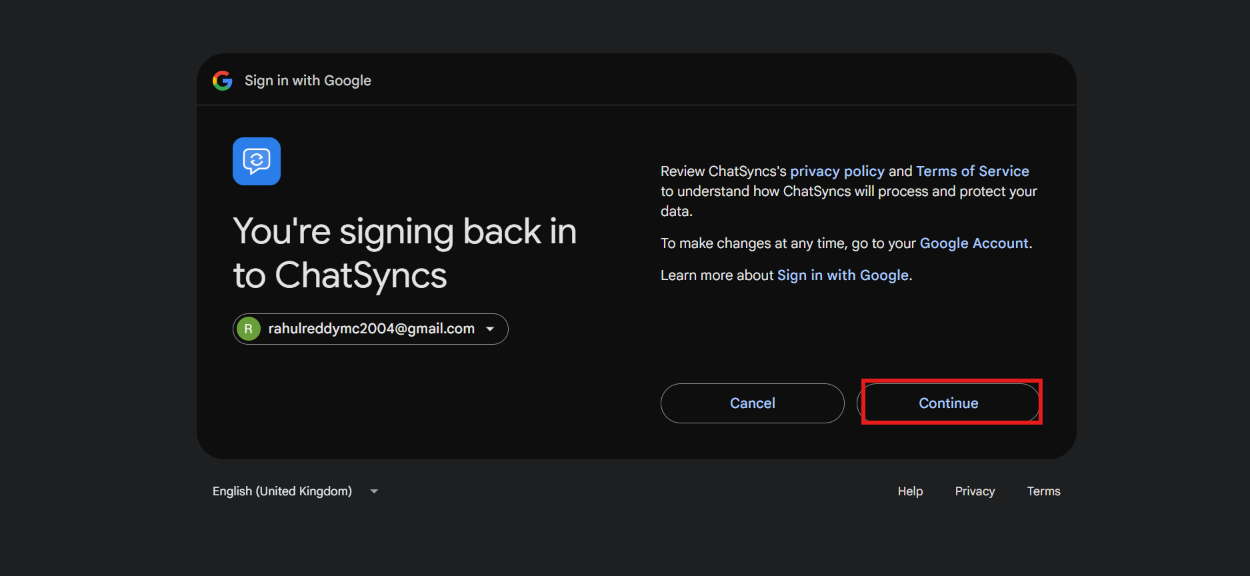
    Google You're signing back in to ChatSyncs screen with account and Continue button

Once connected, the account appears under Google Accounts with the permissions it granted — Google Sheets & Drive, Google Calendar, and Google Contacts — plus Sync Data and Unlink actions.

Grant the Contacts and Sheets permissions, not just Sheets — some ChatSyncs features (like syncing subscriber contact details) need the Contacts scope too. If a feature isn't working after connecting, check that its required scope was actually granted during consent.

Using the connected account#

From the Integrations sidebar, the connected account can create or attach sheets, and manage calendars.

Google Sheets#

Google Sheets list with Create New Sheet and Add Existing Sheet buttons highlighted
  • Create New Sheet — pick the connected account, name the Sheet Title, and optionally Add Header to define column headers up front, then Save. ChatSyncs creates a brand-new spreadsheet in the connected Drive with those headers already in place.
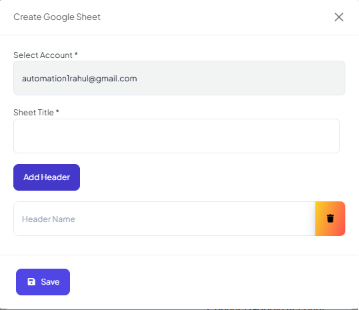
    Create Google Sheet form with Select Account, Sheet Title, Add Header, and Save
  • Add Existing Sheet — point ChatSyncs at a spreadsheet you already have by picking the account and pasting its Sheet ID.
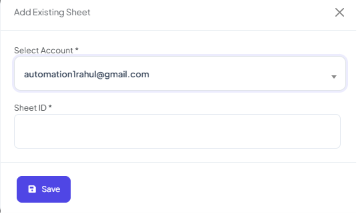
    Add Existing Sheet form with Select Account and Sheet ID fields

Google Calendar#

Google Calendar list with Create New Calendar button highlighted
  • Create New Calendar — pick the connected account, name the Calendar Summary, and choose a Timezone, then Save — for flows that book appointments via Google Calendar.
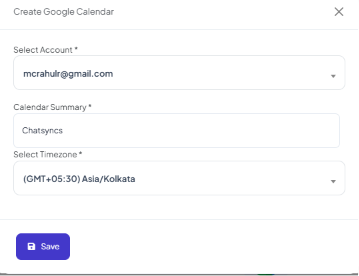
    Create Google Calendar form with Select Account, Calendar Summary, and Select Timezone fields

Use cases#

  • Save subscriber information collected during a WhatsApp conversation.
  • Store form responses from an input flow.
  • Export customer data for reporting.
  • Keep records automatically without manual data entry.

Frequently asked#

Why does Google say 'This app hasn't been verified' when I connect my account?

Because ChatSyncs hasn't gone through Google's app-verification review yet. It's expected — click Advanced, then Go to chatsyncs.com (unsafe) to continue safely.

Can I save bot-collected data straight into a Google Sheet?

Yes — connect a Google account here, then use Create New Sheet or Add Existing Sheet as the destination for a flow step that saves subscriber info or form responses.

I connected Google Sheets but contact syncing isn't working — why?

Check that you granted the Contacts permission during the Google consent step, not just Sheets/Drive — some features need both scopes.

What's the difference between Google Sheet Integration and Google Sheet Fetch?

Google Sheet Integration writes data into a sheet. Google Sheet Fetch reads data from a sheet — for example looking up a customer record the bot then uses in a reply.

Learn From a Use Case#

  • Clinic Appointment Booking Automation — syncs every appointment to a spreadsheet the front desk uses.

Was this page helpful?

Still stuck? Open a support ticket and our team will help.

PreviousHow to Integrate Shopify for WhatsApp Automation in ChatSyncsNext Google Sheet Fetch in ChatSyncs

On this page

  • Connecting an account
  • Using the connected account
  • Google Sheets
  • Google Calendar
  • Use cases
  • Frequently asked
  • Learn From a Use Case