ChatSyncs Help Center
DocumentationVideo TutorialsSupport Ticket
Developer APIREST endpoints for messages, contacts and templates.MCP serverConnect Claude, ChatGPT or Cursor to your account.
Sign inSupport sign-in
  • Docs
  • Videos
  • Tickets
  • For developers

    Developer APIREST endpoints for messages, contacts and templates.MCP serverConnect Claude, ChatGPT or Cursor to your account.
ChatSyncs Help Center

Guides, video lessons and support for ChatSyncs.

Help

  • Documentation
  • Video Tutorials
  • Search

Support

  • Get help
  • Your tickets
  • New ticket

Developers

  • MCP ↗
  • Developer API ↗

ChatSyncs

  • Open ChatSyncs ↗
  • Website ↗

© 2026 ChatSyncs

  • Overview
    • What Is Meta — and Why Do You Need a Facebook Account for WhatsApp?
    • What Is the WhatsApp Cloud API?
    • What Is a Meta Business Portfolio? (vs. Business Manager)
    • What Is a Meta Developer Account — and What Is an 'App'?
    • What Is a WABA (WhatsApp Business Account)?
    • Which WhatsApp Connection Method Is Right for You with ChatSyncs?
    • How to Connect Your WhatsApp Business App to ChatSyncs
    • What Is a BSP — and Can You Move to ChatSyncs From One?
    • Business Verification, Display Name, Green Tick — What's the Difference?
    • WhatsApp Business API Explained (And the Verification Myth)
    • Who Charges You for WhatsApp — Meta or ChatSyncs?
    • What WhatsApp API Pricing Really Means
    • WhatsApp Rules: How to Never Get Banned
  • Setup and Configuration
    • How to Connect Your Number to ChatSyncs
    • How to Connect Your WhatsApp Business App to ChatSyncs
    • How to Create a Facebook Business Manager Account for ChatSyncs
    • Set Up Your Meta Business Account for WhatsApp
    • How to Connect Your WhatsApp Account Manually (Alternative Method) in ChatSyncs
    • How to Add Payment Method for WhatsApp API Billing
    • How to Update Your WhatsApp Business Profile
    • How to Migrate from WhatsApp App to a ChatSyncs Business Account
    • How to Disconnect Another Partner From Your WhatsApp Number
    • How to Reconnect Your Disconnected ChatSyncs Account
    • How to Delete Your Phone Number on Meta
    • Transactions in ChatSyncs
  • Bot Settings
    • How Do I Configure General Bot Behavior with ChatSyncs?
    • How Do I Turn On Webhook Triggers for My Bot with ChatSyncs?
    • How Do I Set Up Business Hours for My Bot with ChatSyncs?
    • How Do I Configure Shared Inbox Settings for My Bot with ChatSyncs?
    • How Do I Automatically Add Subscribers to My Email Marketing List with ChatSyncs?
    • How Do I Save Subscriber Details to Google from My Bot with ChatSyncs?
    • How Do I Send an Automatic Email from My Bot with ChatSyncs?
    • How Do I Send an Automatic SMS from My Bot with ChatSyncs?
  • Subscriber Manager
    • What Is Subscriber Manager in ChatSyncs?
    • How Do I Manage Custom Fields, Labels, and Lists with ChatSyncs?
    • How Do I Import Subscribers Using a CSV File with ChatSyncs?
    • How Do I Add a Subscriber Manually with ChatSyncs?
    • How Do I Import Subscribers from Google Sheets with ChatSyncs?
    • How to Import Contacts from Google Contacts in ChatSyncs
  • Automation
    • How to Create a Keyword-Based WhatsApp Chatbot in ChatSyncs
    • How to Set Up Quick Actions (No Match, Get Started, and More) in ChatSyncs
    • How to Make a Chatbot Reply to Any Keyword in ChatSyncs
    • User Input Flow in ChatSyncs
    • WhatsApp Flow Forms in ChatSyncs
    • How to Connect a Bot Flow to External Systems in ChatSyncs
    • How to Build Automatic Follow-Up Chatbots on WhatsApp in ChatSyncs
    • How to Set Up Sales Sequence Chatbots in ChatSyncs
    • How to Add Clickable CTA Buttons in ChatSyncs
    • Audio Message in ChatSyncs
    • How to Add a WhatsApp Chat Widget to Your Website in ChatSyncs
    • How to Use User Input Flow in the Chat Widget in ChatSyncs
    • How to Add ChatSyncs Chat Widget to WordPress
  • Message Templates
    • Creating a WhatsApp Message Template in ChatSyncs
    • Why Templates Get Rejected and How to Fix Them in ChatSyncs
    • Character Limits for Media Message Templates in ChatSyncs
    • Guidelines for Utility and Marketing Templates in ChatSyncs
    • Understanding Conversations and Their Types in ChatSyncs
    • How to Create and Use Carousel Media Templates in ChatSyncs
    • Create Templates in WhatsApp Manager and Sync to ChatSyncs
    • Template Variables vs Custom Variables — What's the Difference with ChatSyncs?
    • Templates to Restart Conversations After Non-Working Hours in ChatSyncs
    • Understanding WhatsApp Quality Rating in ChatSyncs
  • Broadcasting
    • Send a Bulk Message to Many People
  • Shared Inbox
    • Introduction to Shared Inbox in ChatSyncs
    • Filter Conversations by Channel & Account in ChatSyncs
    • Organize Conversations with Labels, Views & Search in ChatSyncs
    • AI Translation & Message Rewrite in ChatSyncs
    • Team Collaboration & Agent Assignment in ChatSyncs
    • Messaging Tools: Canned Responses, Templates & Attachments in ChatSyncs
    • Follow-up Reminders & Message Sequences in ChatSyncs
    • Managing Customer Data with Custom Fields in ChatSyncs
    • Settings Menu: Groupchat Widget, Dark Mode, Follow-up List & More in ChatSyncs
    • Install ChatSyncs on Android
    • Install ChatSyncs on iOS
  • Webhooks
    • Webhook for Messages & Status Changes in ChatSyncs
    • Webhook on Keyword Trigger in ChatSyncs
    • Webhook on Button Click in ChatSyncs
    • Webhook for Input Flow in ChatSyncs
    • Webhook for WhatsApp Flows in ChatSyncs
  • Webhook Workflow
    • Create a Webhook Workflow in ChatSyncs
    • Webhook Automation Settings in ChatSyncs
    • Webhook Workflow Reporting in ChatSyncs
  • Integrations
    • How to Integrate Shopify for WhatsApp Automation in ChatSyncs
    • How to Connect Google to ChatSyncs
    • Google Sheet Fetch in ChatSyncs
    • How to Send Automated WhatsApp Messages on WP Form Submission in ChatSyncs
    • How to Set Up SMS Marketing in ChatSyncs
    • HTTP API Integration in ChatSyncs
    • Email Integration in ChatSyncs
    • How Do I Connect an SMTP Email Provider with ChatSyncs?
    • How Do I Connect Mailgun for Sending Email with ChatSyncs?
    • How Do I Connect Postmark for Transactional Email with ChatSyncs?
    • SMS Integration in ChatSyncs
    • How Do I Connect Twilio for SMS with ChatSyncs?
    • How Do I Connect Africa's Talking for SMS with ChatSyncs?
    • How Do I Connect a Custom SMS Gateway via HTTP GET with ChatSyncs?
    • Auto Responder Integration in ChatSyncs
    • How Do I Connect Brevo for Auto Responder with ChatSyncs?
    • How Do I Connect Mailchimp for Auto Responder with ChatSyncs?
    • How Do I Connect ActiveCampaign for Auto Responder with ChatSyncs?
    • How Do I Connect Mautic for Auto Responder with ChatSyncs?
  • AI Agents
    • How to Create Your First AI Agent in ChatSyncs
    • How to Train Your AI Chatbot in ChatSyncs
    • Agent Routing in ChatSyncs
    • AI Agent Actions in ChatSyncs
    • How Do I Restrict AI on Specific Keywords with ChatSyncs?
    • How Do I Auto-Assign Conversations to a Department with ChatSyncs?
    • How Do I Build a Multi-Agent AI Workforce with ChatSyncs?
  • Team Management
    • Introduction to Team Management in ChatSyncs
    • How to Add and Manage Team Members in ChatSyncs
    • How to Set Up User Roles and Permissions in ChatSyncs
    • Security in ChatSyncs
  • Account Safety
    • WhatsApp Account Bans: Causes and How to Stay Protected in ChatSyncs
    • How to Appeal a WhatsApp Business API Ban and Get Your Number Back in ChatSyncs
MCP ↗Developer API ↗
Browse guides
  • Overview
    • What Is Meta — and Why Do You Need a Facebook Account for WhatsApp?
    • What Is the WhatsApp Cloud API?
    • What Is a Meta Business Portfolio? (vs. Business Manager)
    • What Is a Meta Developer Account — and What Is an 'App'?
    • What Is a WABA (WhatsApp Business Account)?
    • Which WhatsApp Connection Method Is Right for You with ChatSyncs?
    • How to Connect Your WhatsApp Business App to ChatSyncs
    • What Is a BSP — and Can You Move to ChatSyncs From One?
    • Business Verification, Display Name, Green Tick — What's the Difference?
    • WhatsApp Business API Explained (And the Verification Myth)
    • Who Charges You for WhatsApp — Meta or ChatSyncs?
    • What WhatsApp API Pricing Really Means
    • WhatsApp Rules: How to Never Get Banned
  • Setup and Configuration
    • How to Connect Your Number to ChatSyncs
    • How to Connect Your WhatsApp Business App to ChatSyncs
    • How to Create a Facebook Business Manager Account for ChatSyncs
    • Set Up Your Meta Business Account for WhatsApp
    • How to Connect Your WhatsApp Account Manually (Alternative Method) in ChatSyncs
    • How to Add Payment Method for WhatsApp API Billing
    • How to Update Your WhatsApp Business Profile
    • How to Migrate from WhatsApp App to a ChatSyncs Business Account
    • How to Disconnect Another Partner From Your WhatsApp Number
    • How to Reconnect Your Disconnected ChatSyncs Account
    • How to Delete Your Phone Number on Meta
    • Transactions in ChatSyncs
  • Bot Settings
    • How Do I Configure General Bot Behavior with ChatSyncs?
    • How Do I Turn On Webhook Triggers for My Bot with ChatSyncs?
    • How Do I Set Up Business Hours for My Bot with ChatSyncs?
    • How Do I Configure Shared Inbox Settings for My Bot with ChatSyncs?
    • How Do I Automatically Add Subscribers to My Email Marketing List with ChatSyncs?
    • How Do I Save Subscriber Details to Google from My Bot with ChatSyncs?
    • How Do I Send an Automatic Email from My Bot with ChatSyncs?
    • How Do I Send an Automatic SMS from My Bot with ChatSyncs?
  • Subscriber Manager
    • What Is Subscriber Manager in ChatSyncs?
    • How Do I Manage Custom Fields, Labels, and Lists with ChatSyncs?
    • How Do I Import Subscribers Using a CSV File with ChatSyncs?
    • How Do I Add a Subscriber Manually with ChatSyncs?
    • How Do I Import Subscribers from Google Sheets with ChatSyncs?
    • How to Import Contacts from Google Contacts in ChatSyncs
  • Automation
    • How to Create a Keyword-Based WhatsApp Chatbot in ChatSyncs
    • How to Set Up Quick Actions (No Match, Get Started, and More) in ChatSyncs
    • How to Make a Chatbot Reply to Any Keyword in ChatSyncs
    • User Input Flow in ChatSyncs
    • WhatsApp Flow Forms in ChatSyncs
    • How to Connect a Bot Flow to External Systems in ChatSyncs
    • How to Build Automatic Follow-Up Chatbots on WhatsApp in ChatSyncs
    • How to Set Up Sales Sequence Chatbots in ChatSyncs
    • How to Add Clickable CTA Buttons in ChatSyncs
    • Audio Message in ChatSyncs
    • How to Add a WhatsApp Chat Widget to Your Website in ChatSyncs
    • How to Use User Input Flow in the Chat Widget in ChatSyncs
    • How to Add ChatSyncs Chat Widget to WordPress
  • Message Templates
    • Creating a WhatsApp Message Template in ChatSyncs
    • Why Templates Get Rejected and How to Fix Them in ChatSyncs
    • Character Limits for Media Message Templates in ChatSyncs
    • Guidelines for Utility and Marketing Templates in ChatSyncs
    • Understanding Conversations and Their Types in ChatSyncs
    • How to Create and Use Carousel Media Templates in ChatSyncs
    • Create Templates in WhatsApp Manager and Sync to ChatSyncs
    • Template Variables vs Custom Variables — What's the Difference with ChatSyncs?
    • Templates to Restart Conversations After Non-Working Hours in ChatSyncs
    • Understanding WhatsApp Quality Rating in ChatSyncs
  • Broadcasting
    • Send a Bulk Message to Many People
  • Shared Inbox
    • Introduction to Shared Inbox in ChatSyncs
    • Filter Conversations by Channel & Account in ChatSyncs
    • Organize Conversations with Labels, Views & Search in ChatSyncs
    • AI Translation & Message Rewrite in ChatSyncs
    • Team Collaboration & Agent Assignment in ChatSyncs
    • Messaging Tools: Canned Responses, Templates & Attachments in ChatSyncs
    • Follow-up Reminders & Message Sequences in ChatSyncs
    • Managing Customer Data with Custom Fields in ChatSyncs
    • Settings Menu: Groupchat Widget, Dark Mode, Follow-up List & More in ChatSyncs
    • Install ChatSyncs on Android
    • Install ChatSyncs on iOS
  • Webhooks
    • Webhook for Messages & Status Changes in ChatSyncs
    • Webhook on Keyword Trigger in ChatSyncs
    • Webhook on Button Click in ChatSyncs
    • Webhook for Input Flow in ChatSyncs
    • Webhook for WhatsApp Flows in ChatSyncs
  • Webhook Workflow
    • Create a Webhook Workflow in ChatSyncs
    • Webhook Automation Settings in ChatSyncs
    • Webhook Workflow Reporting in ChatSyncs
  • Integrations
    • How to Integrate Shopify for WhatsApp Automation in ChatSyncs
    • How to Connect Google to ChatSyncs
    • Google Sheet Fetch in ChatSyncs
    • How to Send Automated WhatsApp Messages on WP Form Submission in ChatSyncs
    • How to Set Up SMS Marketing in ChatSyncs
    • HTTP API Integration in ChatSyncs
    • Email Integration in ChatSyncs
    • How Do I Connect an SMTP Email Provider with ChatSyncs?
    • How Do I Connect Mailgun for Sending Email with ChatSyncs?
    • How Do I Connect Postmark for Transactional Email with ChatSyncs?
    • SMS Integration in ChatSyncs
    • How Do I Connect Twilio for SMS with ChatSyncs?
    • How Do I Connect Africa's Talking for SMS with ChatSyncs?
    • How Do I Connect a Custom SMS Gateway via HTTP GET with ChatSyncs?
    • Auto Responder Integration in ChatSyncs
    • How Do I Connect Brevo for Auto Responder with ChatSyncs?
    • How Do I Connect Mailchimp for Auto Responder with ChatSyncs?
    • How Do I Connect ActiveCampaign for Auto Responder with ChatSyncs?
    • How Do I Connect Mautic for Auto Responder with ChatSyncs?
  • AI Agents
    • How to Create Your First AI Agent in ChatSyncs
    • How to Train Your AI Chatbot in ChatSyncs
    • Agent Routing in ChatSyncs
    • AI Agent Actions in ChatSyncs
    • How Do I Restrict AI on Specific Keywords with ChatSyncs?
    • How Do I Auto-Assign Conversations to a Department with ChatSyncs?
    • How Do I Build a Multi-Agent AI Workforce with ChatSyncs?
  • Team Management
    • Introduction to Team Management in ChatSyncs
    • How to Add and Manage Team Members in ChatSyncs
    • How to Set Up User Roles and Permissions in ChatSyncs
    • Security in ChatSyncs
  • Account Safety
    • WhatsApp Account Bans: Causes and How to Stay Protected in ChatSyncs
    • How to Appeal a WhatsApp Business API Ban and Get Your Number Back in ChatSyncs
MCP ↗Developer API ↗
DocumentationSetup and Configuration

How to Add Payment Method for WhatsApp API Billing

How to add a payment method to your WhatsApp Business Account in Meta Business Suite, so Meta can bill you for template messages.

On this page
  • Set it up
  • What's next
  • This step happens on Meta's side, once per Business Portfolio — not inside ChatSyncs.
  • Meta bills you directly for WhatsApp messages (per delivered message), not ChatSyncs. See What WhatsApp API Pricing Really Means for the plain-English breakdown, or Message Categories & Pricing for the full API-level rules.
  • Meta requires a payment method on file before it lets a paid template message go out. Since October 1, 2026 free-form replies inside the customer service window need one too once the number has used its 1,000 free service messages for the month — without a payment method, Meta stops delivering them.

Set it up#

  1. 1

    Open your Business Portfolio's settings

    In Meta Business Suite, click your business portfolio name in the top-left switcher, then click the gear icon next to it to open Settings.
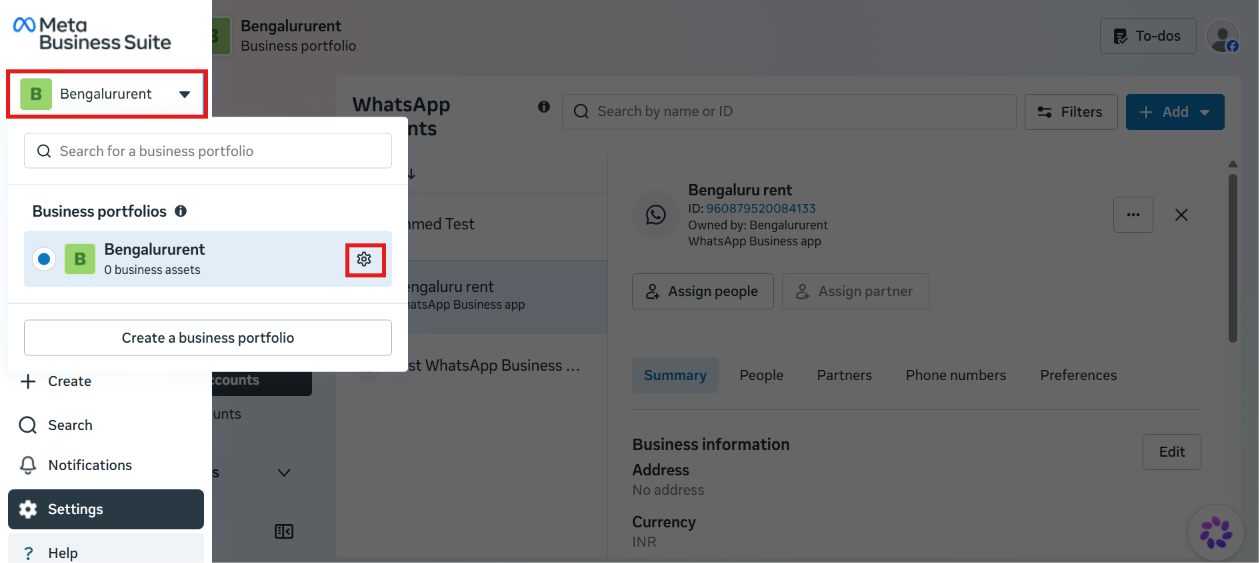
    Meta Business Suite business portfolio switcher open, showing the Bengalururent business portfolio with its settings gear icon highlighted
  2. 2

    Open your WhatsApp account's payment settings

    Under Accounts → WhatsApp accounts, select the WhatsApp Business account you want to bill. Its current Payment method (if any) shows on the right. Click Payment settings.
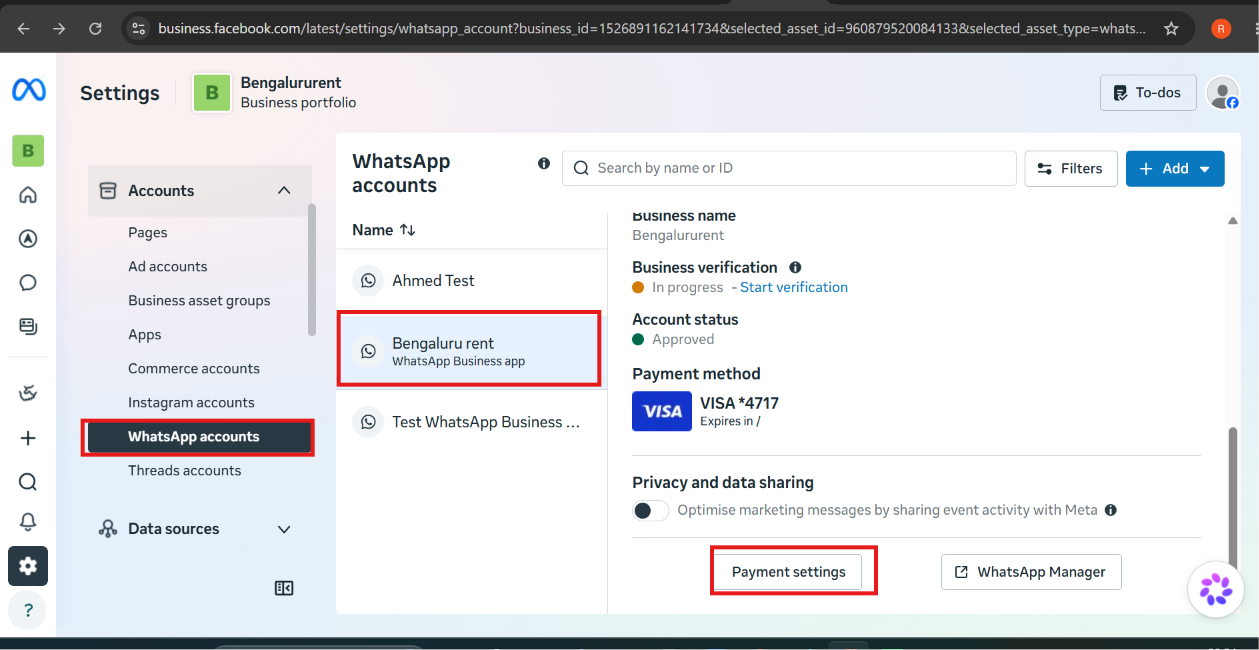
    Meta Business Suite Settings, WhatsApp accounts list with one account selected showing its Account status, Payment method, and a highlighted Payment settings button
  3. 3

    Add a payment method

    This opens Billing & payments. Under Payment methods, click Add payment method. You can have more than one card on file — Meta uses whichever is marked Default.
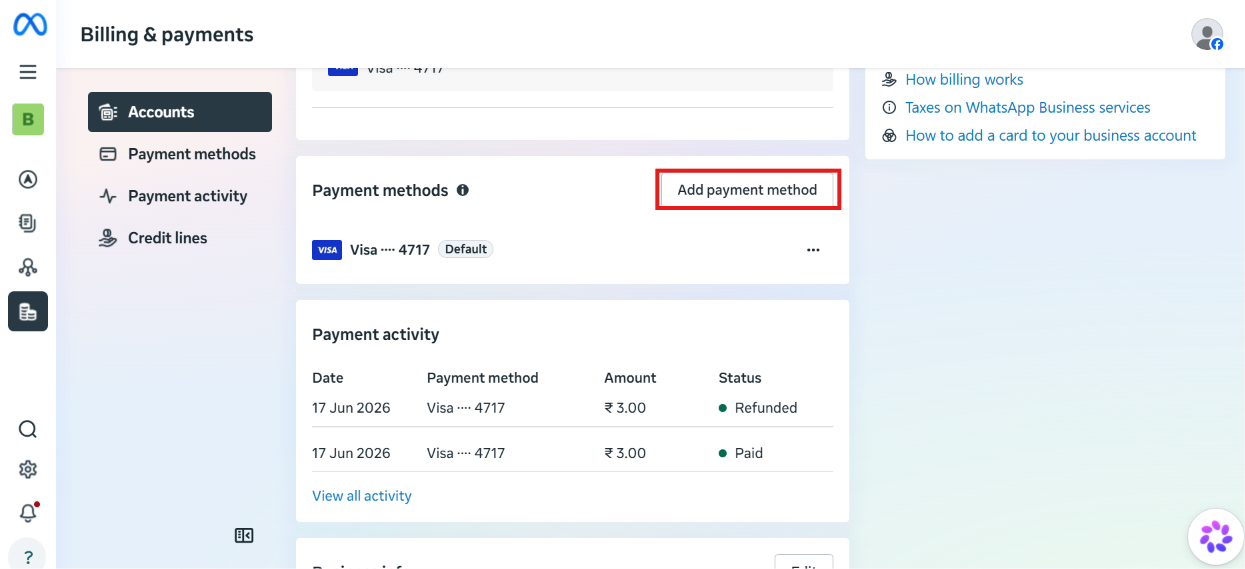
    Meta Business Suite Billing and payments page, Payment methods section showing one existing Visa card and a highlighted Add payment method button, with a Payment activity table below
  4. 4

    Set your location and currency

    In the Add payment information dialog, choose the Country/region, Currency, and timezone, then click Next.
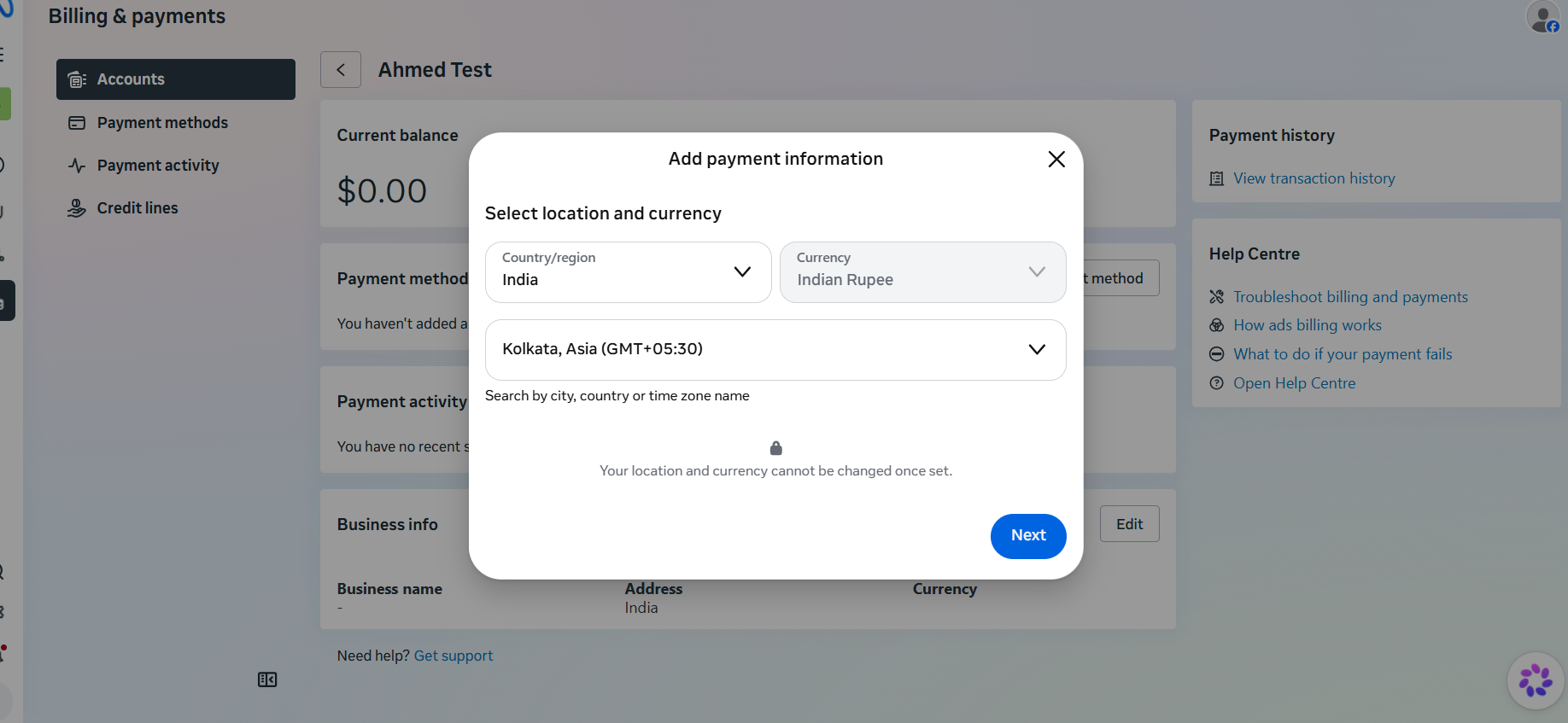
    Add payment information dialog with Country/region set to India, Currency set to Indian Rupee, timezone set to Kolkata, and a Next button

    Location and currency cannot be changed once set. Double-check both before clicking Next — changing them later means removing the payment method and starting over.

  5. 5

    Enter your card details

    On the Debit or credit card screen, fill in the Name on card, Card number, expiry (MM/YY), and CVV, check the authorization box, then click Save.
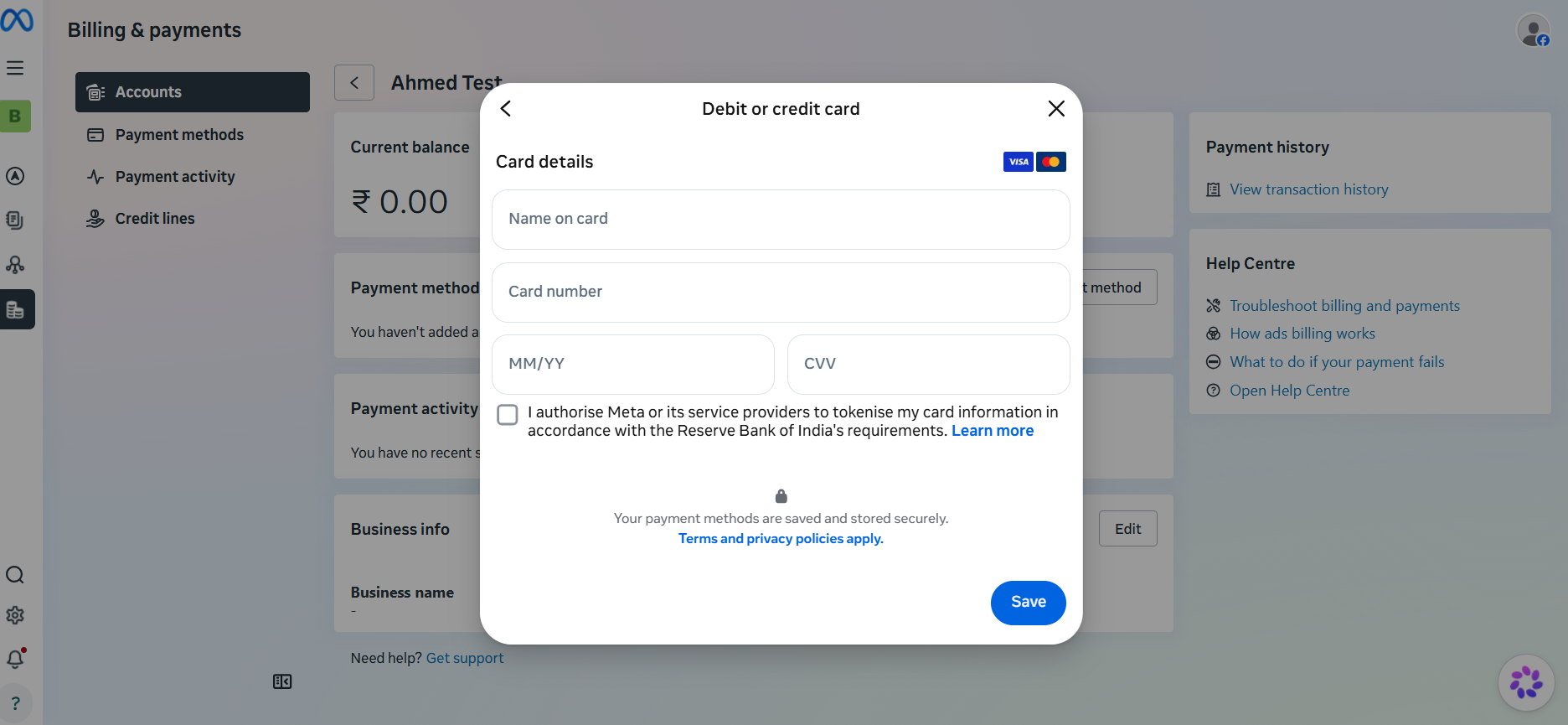
    Debit or credit card dialog with Name on card, Card number, MM/YY, and CVV fields, an authorization checkbox, and a Save button

Some cards get an error on the first attempt — this is usually the card issuer declining, not a problem with the details entered. Try a different card if one gets rejected; a second card often goes through where the first didn't.

Expected result: The account's Payment methods list shows your new card, and it's ready to be billed for template messages, based on the template's category and the recipient's country.

This same Billing & payments page also has a Payment activity tab, showing every charge against this payment method — useful for checking a charge without leaving Meta Business Suite.

Right after saving a payment method, Meta sometimes shows a banner asking for missing business information (Legal Business Name, Address, Phone Number, Website). Click it and fill in whatever's requested — Meta won't process billing until that information is complete.

What's next#

With a payment method on file, your number can keep sending paid template messages without interruption. See Message Categories & Pricing for what actually gets billed, or head back to How to Connect Your Number to ChatSyncs if you haven't finished that yet.

Watch the video lesson

Video lesson · 2:10How to Add a Payment Method for WhatsApp API

Was this page helpful?

Still stuck? Open a support ticket and our team will help.

PreviousHow to Connect Your WhatsApp Account Manually (Alternative Method) in ChatSyncsNext How to Update Your WhatsApp Business Profile

On this page

  • Set it up
  • What's next